
I rebuilt this site between 30 September and 9 October 2026, brand first: a new logo I made in Canva, every page designed in Claude Design, then built page by page in Claude Code. It now scores 99 to 100 for performance on a phone and 100 on desktop in PageSpeed Insights, with motion on every page and one 21 KB font file. Every word and every image on the site runs off a field, every article gets a picture drawn in code, and visitors are counted without cookies or IP addresses. Claude Code made it fast, and like every AI tool it drifts towards the average website. Holding every page to its design and to the brief is what kept the result mine. The problems worth reading about were the quiet ones: things that ran, reported success, and were wrong.
In July I ran a design review of my own website, and one line in it stung more than any bug report. It called the site “tidy rather than composed”. Every section wore the same silhouette. Nothing was broken, and nothing stood out.
That is an uncomfortable sentence to read when your business is building websites. A studio gets judged on its own site first, and mine looked finished. It passed its own checks. But I had built it in a hurry and improved it in place, and every improvement stood on the shoulders of the last one.
At the end of September I stopped patching it. Ten days later a different site was live: a new logo, new colours, one typeface, every page redesigned and rebuilt, every word moved into a field. This is the story of those ten days. What I had, what I wanted, how I went about it, and the things that broke on the way. The technical parts are here for developers. The rest is for anyone who has looked at their own website and thought it could be so much better.
The old site looked finished and was quietly fighting itself
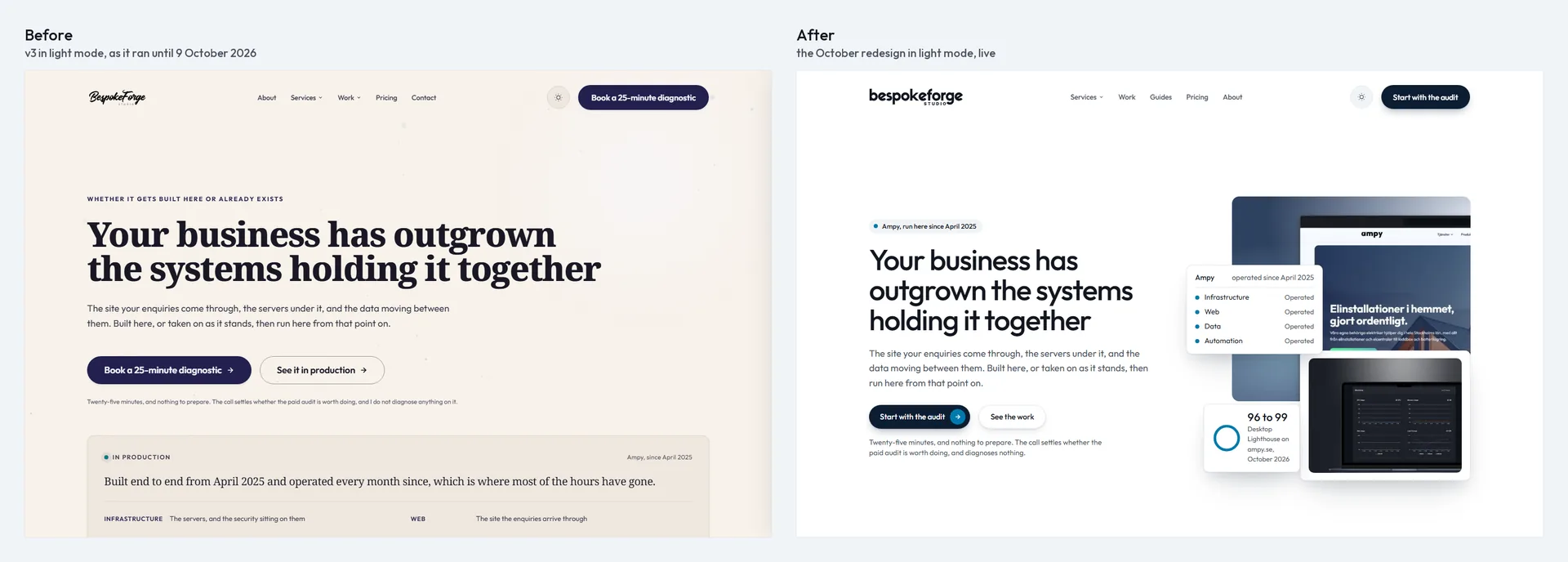
Under the bonnet, the old site was respectable. A custom WordPress theme with PHP templates, the classic editor, no page builder, content in custom fields and GSAP for the animation. If you had asked me for the stack, I would have told you with some pride.
The trouble was how it had grown. I built it live first and put it under version control second. The earliest commits in its history are snapshots rescued from the live server, and the theme was already at version 3.1 the day it entered a repository. Between April and July it gathered 87 more commits, most of them made with visitors already looking at it.
You could read that history in the design. I had built a brass secondary colour, a layout “wave”, a Three.js hero and a yellow glow, admired each one for a day and quietly taken it out again. What survived was a site in two moods: warm paper with a deep indigo accent in light mode, charcoal with lavender in the dark. Serif headings sat beside a sans-serif body. There was a script wordmark, uppercase labels in pills, glows, grain, a dot grid and an animated ember canvas glowing behind the hero. Even the italics were fakes. The browser slanted a font that has no italic of its own.
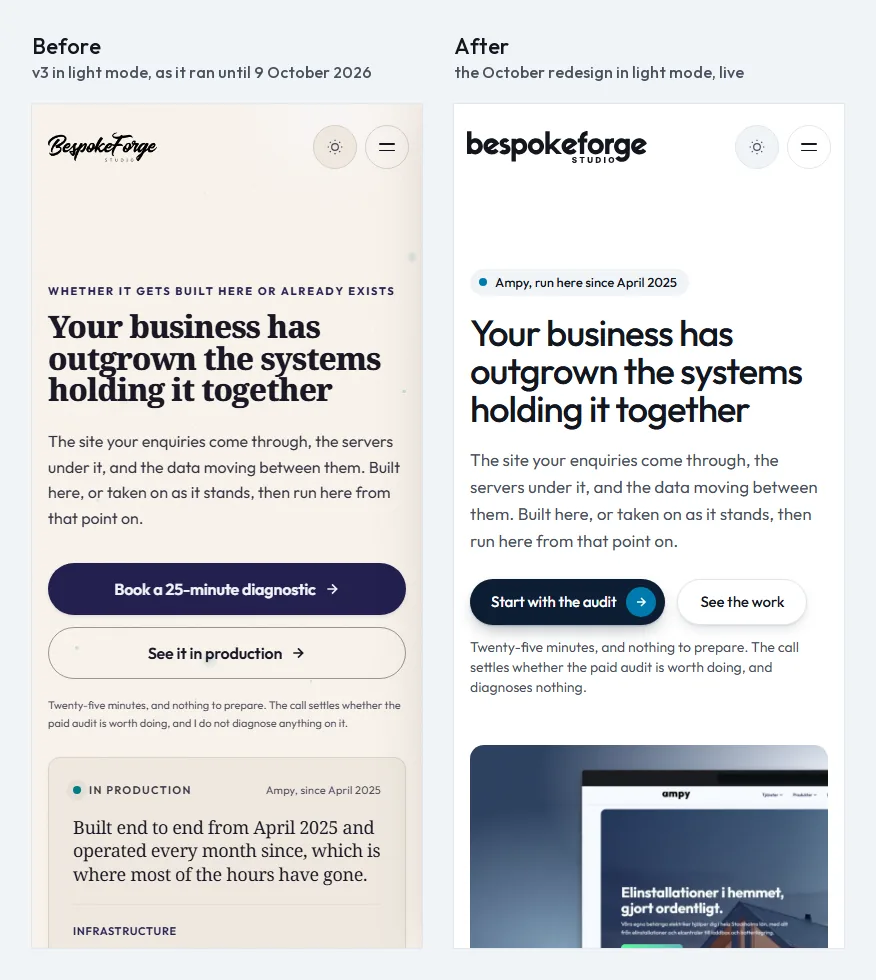
The homepage had thirteen sections, each with the same background and the same padding. At 1,200 pixels wide it measured 11,350 pixels tall, about fifteen screens of scrolling. The proof arrived late. The services sat tenth of thirteen. And the main booking button sent people to a contact page whose calendar started about 3,000 pixels down, which is a long walk for someone who has already decided to talk to you.
Underneath, the front end had piled up the same way:
- 205 custom properties in three blocks, and not one of them a duration. About 30 different animation timings and 28 letter-spacing values.
- An animation file of 1,214 lines. It split every heading into single letters, sped everything up by a global factor of 1.3, counted numbers up, scrubbed parallax and drove two timelines aimed at markup that no longer existed.
- Two font families, plus two font files and two scripts that nothing loaded.
- A safety net with a hole in it. The reveal fail-safe marked itself done before any animation had run.
- Words written into the code. The services menu came from definitions in PHP, the header carried its own list of links, and the footer was a template.
None of it crashed, and that was the real problem. In July, two whole sections of one page and the footer’s legal links sat at zero opacity at certain window heights. Every automated check passed, because the checks asked whether the elements existed. They did. Nobody could see them.
I wanted a buyer to feel settled, and to be able to check every claim
The brief I wrote for the new site fits on one line: a sceptical, competent buyer should land on it and feel they have found the right team. Not excited. Settled. The feeling you get when you hand a hard problem to someone who has clearly solved it before.
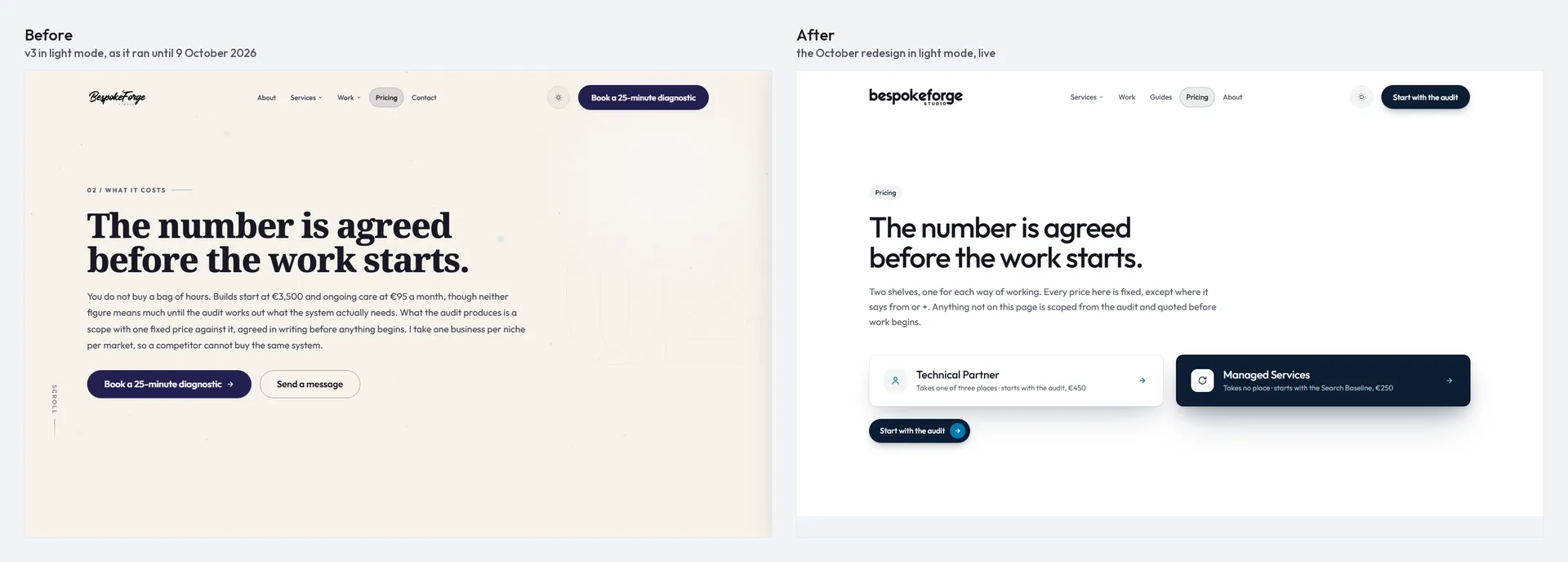
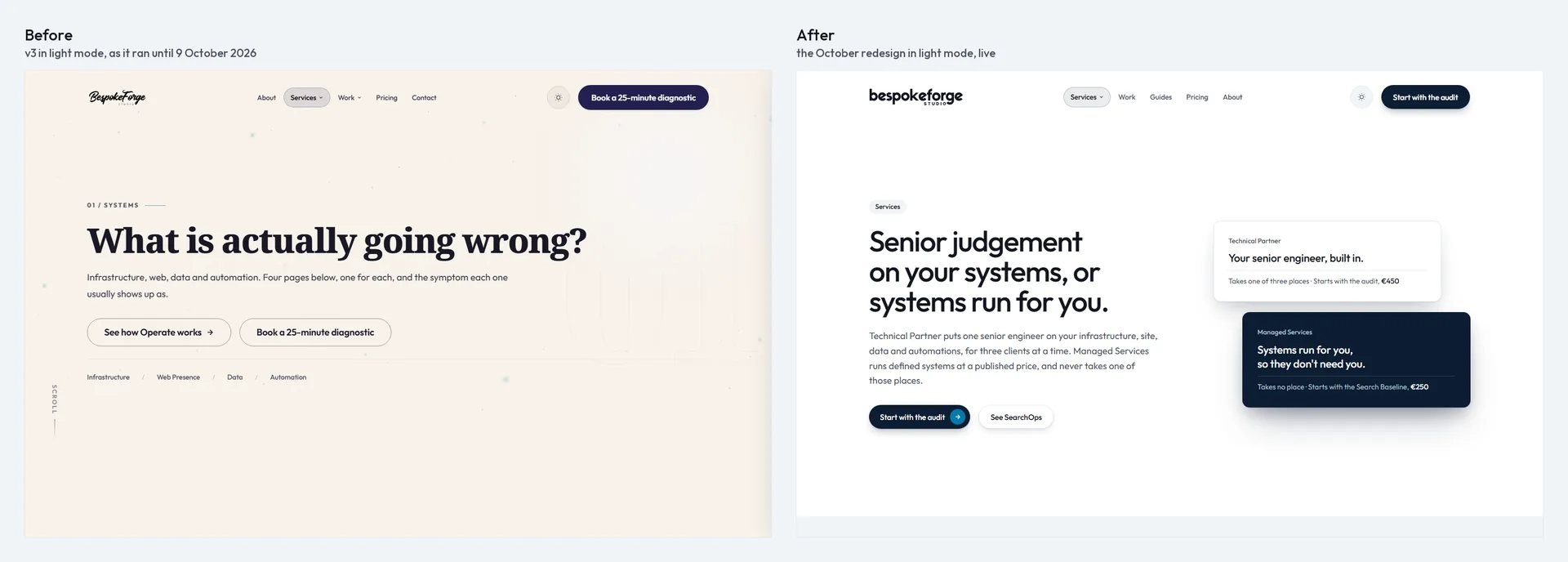
On 30 September I made the decision the whole site would hang from. BespokeForge sells two ways in. Technical Partner is senior judgement, for at most three clients at a time. Managed Services are systems the studio runs, and they never take one of those three places. The old homepage buried that choice tenth of thirteen. The new one had to put it on the second screen, straight after the proof.
The rest of the wish list wrote itself from the old site’s habits:
- Proof anyone can check. Every figure names its client, the tool that measured it and the date, and comes from something a visitor can open themselves: a public status page, an SSL Labs grade, a PageSpeed run.
- Motion that feels alive. Not decoration. A site that answers back when you touch it.
- Nothing hard-coded. Every word a visitor reads, and every link in the header and footer, editable in WordPress without opening the theme.
- Fast on a phone, without giving up any of the above.
And one rule for the process mattered more than any goal. Nothing would leave my machine until the whole thing was finished. GitHub and the live server would see the new site once, at the very end.
How the rebuild went: a brand update first, then one page at a time
The temptation with your own site is to start fixing things. I had been doing exactly that since April, and it had produced exactly this. So this time I made myself plan the whole rebuild before building any of it, and I made the plan start with the brand, because every page would inherit it.
The logo came first, and it came out of Canva. I drew a new lettered wordmark there, and a monogram to go with it. Then I used Claude to turn my artwork into a clean SVG that the site could draw in any colour, so one file would serve the light theme and the dark one.
With the logo in hand, I took the brand into Claude Design and worked it out on screen. Three rounds of directions for colour and type. I threw out the first round, warm paper and a serif display face, entirely. It was the old site wearing a new coat. For the second I worked from my own references, and it came out light and cool and led by proof. I kept one direction’s typeface, sizes and layout and another’s colour, and in the third round I settled how much of that colour to use. On 2 October I called the brand finished.
Then the pages. I designed every one of them in Claude Design, a board per page, and went round and round until each looked the way I wanted. The design file for the inner pages alone reached version 29 before I was happy with its last board. I built no page until its board was right.
Then I built it, one page at a time, in Claude Code. Think of it as my IDE, just a much faster one. The decisions, the design and the work stay mine, and it gets me from a decision to working code sooner. I held every page against its board. The homepage went first, on 3 October, and it taught me the most important lesson of the whole build.
The plan had been the homepage and a handful of key pages. On 4 October, with the homepage right, I changed my mind. If the brand was new, every page should be. So the inner pages followed in batches. The services hub, the four disciplines, SearchOps and pricing on the 4th. The service pages, contact, About and the questions on the 5th. The work, the guides, the articles and the legal pages on the 6th. The case studies, retold as build stories, and the article pictures on the 7th.
My first About page was accurate and it was empty. There was no soul in it. People hiring a one-person studio need to know the person, so I rewrote it to open with a photograph and my own words. It is one of only two places where the site speaks in the first person.
By the end, the homepage had gone from thirteen sections to seven, and seventeen service pages had become fourteen. None of them carries a price, the structured data included, because a single service is scoped from the audit. On 8 October I spent the day deleting things, on 9 October I gave every page a last editorial read, and the same day I took the whole site live in one go.
The brand came first: a new logo, one typeface, and one accent on white
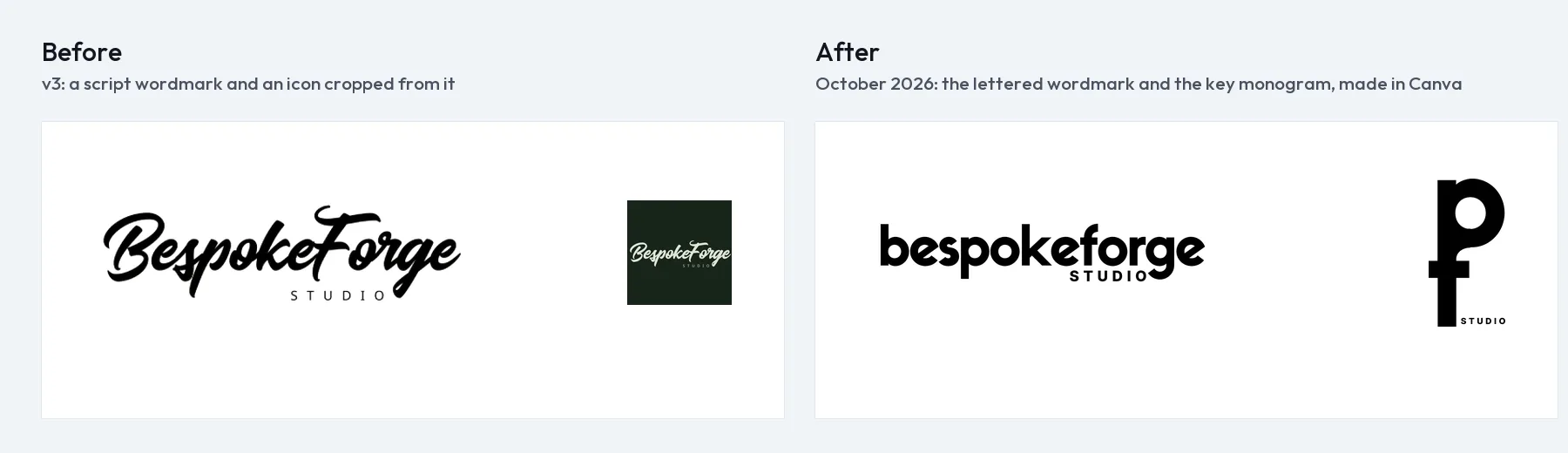
The old identity had charm and no discipline. A brush-script wordmark with “STUDIO” spaced out beneath it, and a site icon cropped from the same script on a dark square. Deep indigo, #22204E, for buttons and weight, on a warm paper ground, #FDF7F0, under a grain texture. Teal, #00626F, for figures and labels. In dark mode a lavender accent, #A6A4DF, on #1C1C23, and the visitor’s device decided which of the two they saw first. The type ran to fourteen font sizes on the homepage alone. None of it was wrong on its own. Together it said “a designer’s portfolio” when the brief needed “a studio you would trust with your servers”.
What I wanted was refined editorial minimalism: the restraint of the best product sites, the confidence of a serious newspaper, the calm of an architecture studio. A mark that reads as a studio, not a signature. One accent, not three. Contrast measured, never judged by eye.
The new wordmark is lettered rather than written. The SVG on the site is a trace of my Canva artwork, a 98 to 99% pixel match, drawn in currentColor so the same file turns white in dark mode on its own. Below 180 pixels wide the wordmark gives way to the monogram I made with it. It is the p and the f of BespokeForge sharing one stem, with “STUDIO” set beside it. Put together, the two letters look like a key. That was the point. In a browser tab the mark stands alone; at app-icon sizes it sits on its full tile.
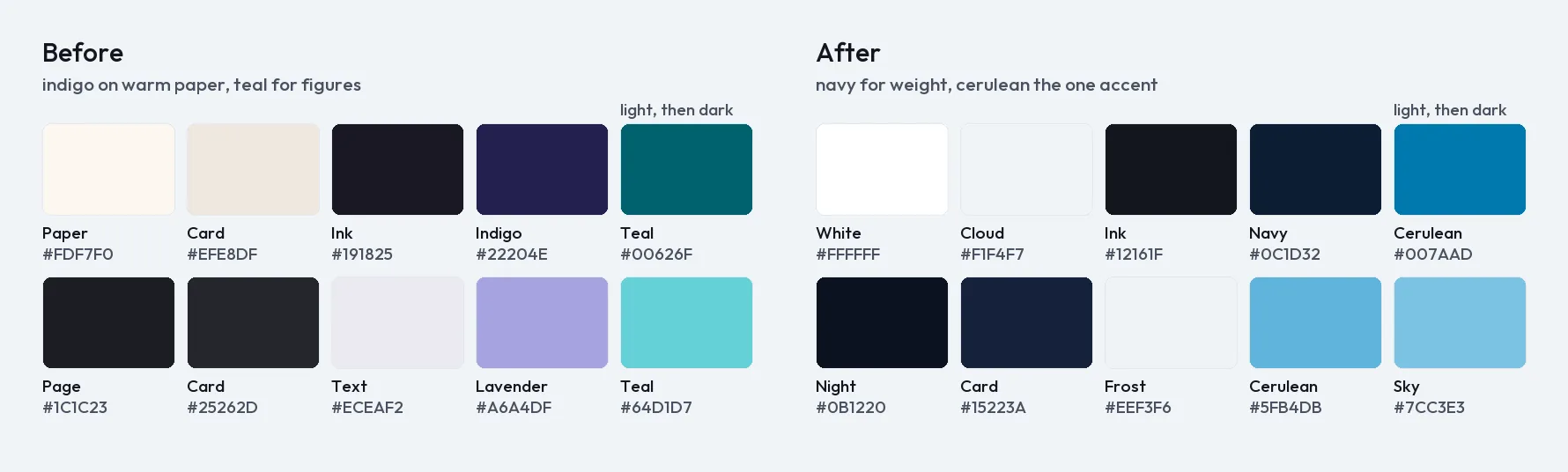
Every colour in the new palette has a job, and there is only one accent:
| Role | Light | Dark |
|---|---|---|
| Page | White #FFFFFF | Night #0B1220 |
| Tinted section | Cloud #F1F4F7 | #101A2B |
| Text | Ink #12161F | Frost #EEF3F6 |
| Secondary text | Graphite #4A5160 | Haze #A9C2CD |
| Buttons, closing chapter | Navy #0C1D32 | Frost |
| Accent, fills and marks | Cerulean #007AAD | #5FB4DB |
| Accent, as text | Deep cerulean #006A96 | Sky #7CC3E3 |
Navy carries the weight: primary buttons and the closing chapter of every page. Cerulean marks proof and action: figures, status, links, and one large surface, the proof band. Every text colour measures at least 5.0 to 1 against its background in both themes, and the lowest is 5.1. The cerulean fill is only 4.7 to 1 on white, under that floor, so it never carries small text; text in cerulean uses the deeper value.
One typeface, Outfit, at two weights: 500 for every heading and 400 for everything else. Seven sizes, from 64 pixels for the display step down to 13 for a tag, each a fluid clamp between its phone size and its desktop size. Sentence case everywhere, no italic at all, and tabular figures wherever numbers stand in a column.
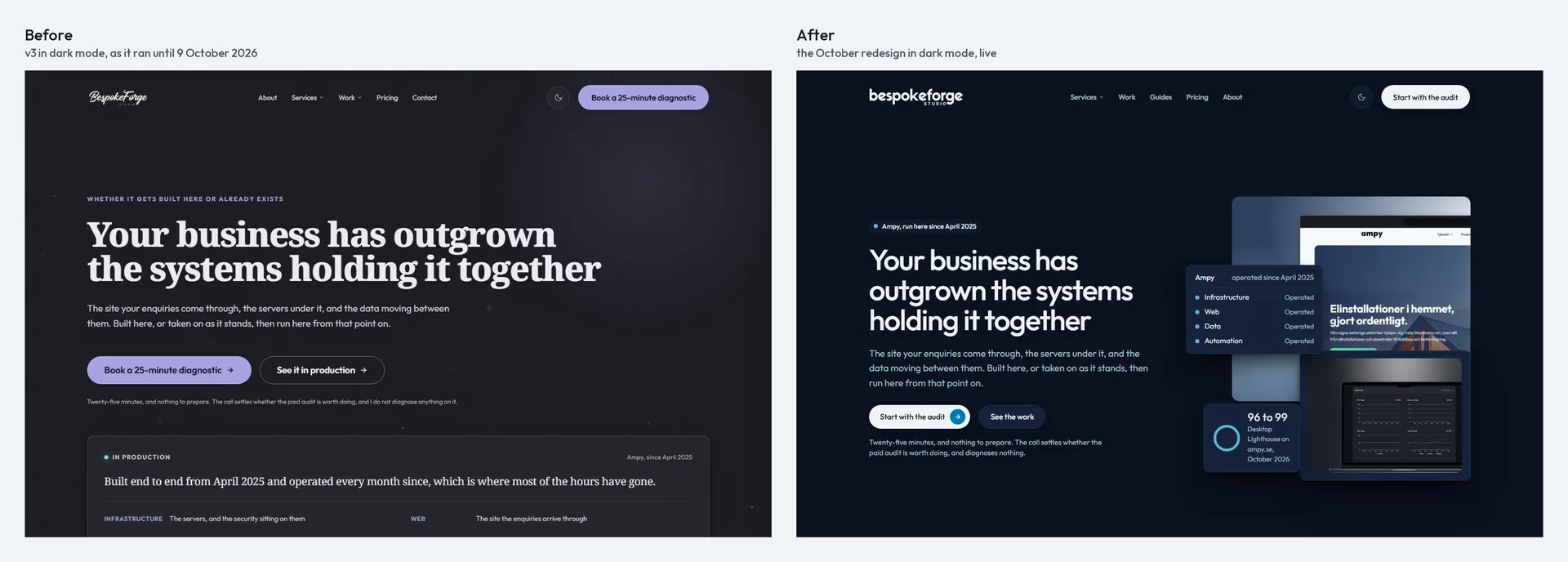
Every first visit is light, whatever the device prefers, and a choice made with the toggle wins after that. The dark theme is a full navy one, not a dimmed copy of the light. There are no gradients, glows or grain anywhere. Where two sections meet, the seam is a hard step between white, cloud and navy, like turning a page. Cards and buttons float on layered shadows, tinted navy on the light ground and black on the dark, never in the accent.
The switch itself was the boring part, on purpose. I did not rewrite the CSS from nothing. I replaced the values of the old design tokens in place and kept the old names alive as aliases of the new ones:
:root {
  --t1: var(--bf-text);            /* old text colour, now the brand's ink */
  --accent: var(--bf-button-bg);   /* old indigo, now navy */
  --aqua: var(--bf-accent-text);   /* old teal, now deep cerulean */
}
From the first day, every old page rendered in the new brand, which is what made “one page at a time” possible. Nothing ever looked half-migrated. When the last page was rebuilt, I deleted the aliases nothing read any more.
The brand had its own small battles. A faint grey band ran down every page on white. It was the closed mobile menu, sitting off screen with its shadow still on, invisible on the old dark ground and plain as day on the new one. The keyboard focus ring that showed clearly on white measured 1.03 to 1 on the navy cards, so every navy and cerulean surface now sets the ring to its own text colour.
The logo is still a trace, by the way. A good one, but the original vector is on my list.
Scroll animations don’t need to slow your site down. Hiding content until they run is what hurts your business.
Here is the trap. A visitor arrives, the page is “loading in” with tasteful fades, and something fails: a script is slow, a library errors, a scroll trigger never fires. The content was hidden by CSS, waiting for an animation that never comes. The visitor sees an empty section and leaves. You see a perfect score, because the content is technically on the page. That was my July bug, and it is far more common than people admit.
The first version of the new homepage went the other way. It was calm, correct and completely still. On 4 October I looked at it and wrote: “it looks good but doesn’t feel good”. So I rebuilt the motion from the ground up, on established motion-design principles: a strong ease-out for anything arriving, short staggers, only transform and opacity, and reduced motion as a fade rather than nothing.
The old animation file was 1,214 lines. The new one is 203, and it does five jobs:
- The hero enters on load: its parts rise 32 pixels and fade in, 100 milliseconds apart.
- Groups stagger in as they scroll into view, 24 pixels of travel, about 80 milliseconds apart.
- Single elements fade in with 16 pixels of travel.
- Images uncover from the bottom while they settle from a slight zoom.
- Article pictures play their own drawing in, with no animation library at all.
The rules matter more than the jobs. Content is never hidden by CSS, with one exception. The page hides the hero’s entering parts before its first paint, and it always shows them again after 1.5 seconds, whatever happens. Everything further down gets its starting state from the script itself, so if the script, the library or the scroll plugin fails, the page simply shows everything. The safety net for the hero is a few lines in the head, and the timer in it does not depend on the animation library at all:
<script>
(function (d) {
  d.classList.add('sig-pending');
  window.setTimeout(function () { d.classList.remove('sig-pending'); }, 1500);
}(document.documentElement));
</script>
html.sig-pending [data-enter] { opacity: 0; }Without JavaScript, the class is never added and nothing is ever hidden. With it, the motion script removes the class as soon as it runs, and the timer removes it anyway if it doesn’t.
The July footer had a second lesson in it. A scroll trigger set to fire when an element reaches a point on the screen will never fire for an element at the very bottom of a short page, because the page cannot scroll that far. One clamp ends that for good:
ScrollTrigger.create({
  trigger: el,
  start: 'clamp(top 88%)', // never later than the page can scroll
  once: true,
  onEnter: fn,
});
Only transform and opacity ever move, plus clip-path for the image uncover, so nothing shifts the layout. Layout shift on the live site is 0. Groups already on screen when the page loads are left alone, so nothing flashes. An image never uncovers over an empty box. The browser counts a clipped image as out of view, so a lazy image would never even start loading. The script starts its download one screen early and waits for it, 1.5 seconds at most. Every duration is a token, ten of them, from 160 milliseconds for a press to 8 seconds for the slowest loop. Cards lift when you point at them, buttons press back when you click, and under reduced motion everything still arrives, as a short fade with no travel.
The rest of the speed came from taking things away. One self-hosted variable font file, cut down to the Latin characters and the two weights the site uses: 21,120 bytes. The serif and the unused font files deleted. font-synthesis: none, so the browser never fakes a bold or an italic again. And the booking calendar became the site’s own, so no page loads a booking script from anyone else.
Two moments from this part of the build still make me wince. The first was a motion file that loaded, logged nothing, and never ran. A small performance snippet added defer to a fixed list of scripts, the animation library among them. The new file was not on the list, so it ran while the page was still being read, found no animation library, and took its polite fallback exit. No error anywhere. The only clue was a class missing from the page’s root element. I now enqueue scripts with WordPress’s own defer strategy, and I look for the class the script sets once it has really run, never just for the script tag.
The second was the new homepage heading, which set in four lines on my own phone. A minimum font size of 40 pixels broke it between 320 and 390 pixels wide. The size now follows the column with no floor, so it sets in three lines everywhere: 29 pixels at 320, 37 at 390, 56 on a laptop.
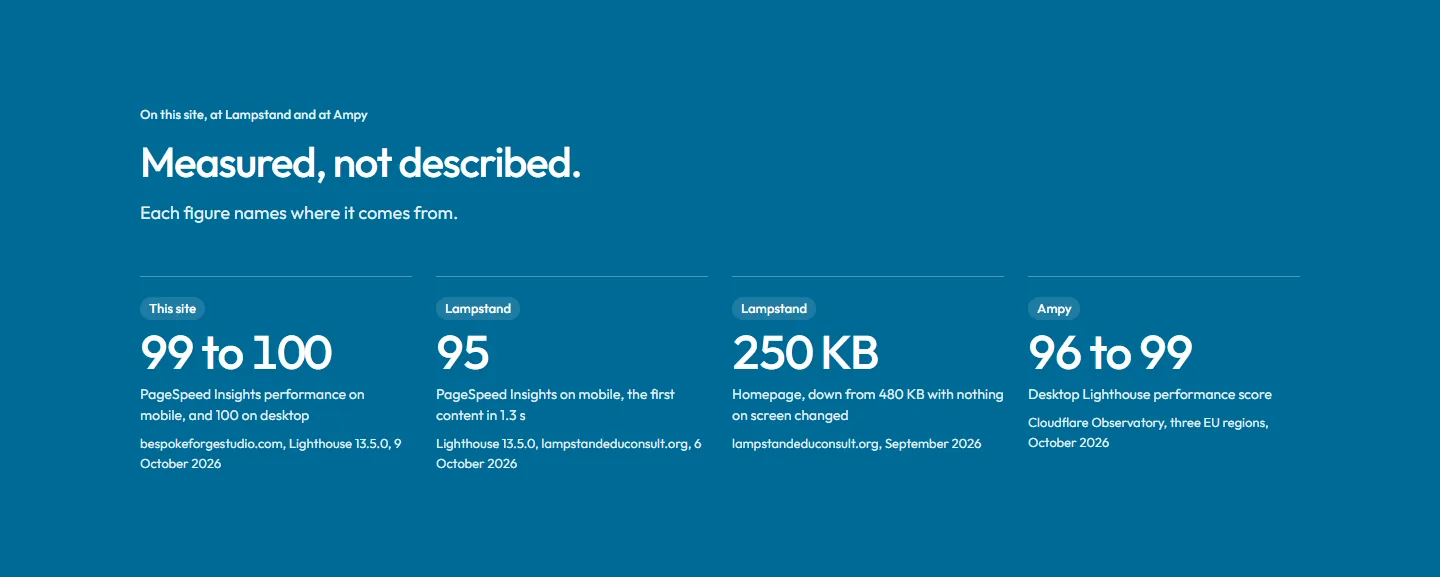
I measured the live homepage on 9 October in PageSpeed Insights, with Lighthouse 13.5.0 and its emulated mid-range phone on slow 4G. Performance came out at 99 to 100 across four runs, with the largest paint at 1.7 seconds and layout shift 0. Desktop scored 100, with the largest paint at 0.4 seconds. Accessibility, best practices and SEO scored 100 on both. Motion did not cost a single point.
Every word and every image on the site runs off a field
In August I learned what happens when words live in the wrong place. I deployed nine theme files, and live went on showing a call to action I had retired, on six pages. The site did not error. The new code was there. The old words lived in the database, and a code deploy never touches the database. The site just quietly said the wrong thing to everyone who visited.
On the old site, copy lived in three places at once: the templates, page fields and global options. Some options were defined two or three times in different field groups. One group was attached to an options page nobody had ever registered, so it showed nowhere at all. And a piece of setup code wrote old closing copy back into empty options every time the admin loaded.
So the new rule was absolute. Nothing a visitor reads or sees is written into the theme. Every word on the site runs off a field, and so does every image: the photographs on the homepage, the screenshots on the service pages, the photographs on About, the galleries in the case studies. Swap a picture in the editor and the page follows. The fields are Secure Custom Fields, the WordPress.org fork of Advanced Custom Fields, and the way I use them has three parts.
First, every string has a default. Each page has a copy deck in the theme, a plain PHP array of the words I approved. A template never prints a field directly. It asks for a name, and gets the page’s field if it has one and the deck’s words if it does not:
// Simplified from the theme.
function bf_copy( string $name, ?int $post_id = null ): string {
    $value = trim( (string) get_field( $name, $post_id ) );
    if ( '' !== $value ) {
        return $value;
    }
    $deck = bf_deck_for( $post_id ); // the page's approved copy
    return (string) ( $deck[ $name ] ?? '' );
}
Because the defaults are the approved words, an emptied field can never publish old text, and the defaults travel in version control with the code. The August mistake cannot happen again. Images work the same way: an empty image field falls back to a default picture the theme ships, so a page never shows a hole where a photograph should be.
Second, the field groups follow sections, not pages. A section that appears on several pages has one group, with the same field names wherever it shows. The hero, the questions, the proof band and how the work runs are all built that way. Each page then has one small group for the sections only it has. Change a shared section’s fields once, and every page that shows it changes. In the editor, each page’s fields sit in tabs named after its sections, with plain labels and a line of help under every field, so editing the site feels like editing a document rather than a database.
Third, I never write field groups by hand. I generate them from the copy decks as JSON, into the theme’s acf-json folder, where Secure Custom Fields picks them up as local JSON. The generator writes files and never touches the database. The groups reach the database only when I choose to run the plugin’s own sync.
Prices never sit in copy either. The words carry tokens such as €450, and a function fills them from the price records, so a price changes in one place and every page that mentions it follows. Editable words never pass through sprintf(), because a stray percent sign typed by an editor throws an error. I fill placeholders with plain string replacement. And the menus are ordinary WordPress menus built from custom links: a parent item per group, the group’s subtitle in the item’s description, flags as CSS classes. Assign no menu, and no links render. There is nothing in the theme to fall back on.
This part of the build had the sneakiest problems of all. One generated field key collided with a key left in the old site’s database, and the plugin quietly merged the two definitions; nothing showed on any page. The generator now stops on any key or name that something else already uses. wp_update_post() reset a page’s template to “default” when the template file did not exist yet, and reported success. Publish first, set the template second.
And the one I would warn every WordPress developer about: saving a post stripped every backslash out of a code sample. wp_update_post() unslashes whatever you give it. A guide’s PHP example lost all 23 of its backslashes when a script saved it, and at a glance the article looked fine. I found it by comparing every saved post with its last revision, restored it from that revision, and now every save is slashed first:
wp_update_post( wp_slash( array(
    'ID'           => $post_id,
    'post_content' => $new_content,
) ) );
A picture for every article, drawn in kilobytes
I am going to write a lot of articles. Each one deserves a picture, and the honest options are all bad. Making an image by hand every time is slow enough that it quietly stops happening. Stock photography of laptops says nothing. And a generated picture on a technical article looks exactly like what it is, which is the opposite of the trust the site is built for.
So the pictures are drawn in code. Every article gets an inline SVG, 640 by 360, drawn from its category. There are two scenes for each of the five guide categories, ten in all, and each tells a small story about its subject in moving tokens and lines. The colours are CSS classes mapped to the brand’s tokens, so dark mode recolours the picture with no second file. The motion is pure CSS. A picture weighs a few kilobytes and needs no request of its own.
Each scene comes in two looks: Line, fine strokes with cerulean marks, and Blocks, solid shapes. A category’s articles take the four combinations in turn as they are published, so neighbours never look the same. An article keeps its look for good once it is out, so nobody ever sees a picture change under them.
A picture is drawn at rest. The markup is the last frame: a moving token sits at its end point, and its animation starts from where it set out. So a page with no script, a printout, a share card and a visitor with reduced motion all see a finished picture. Below the fold, the script holds a picture at its first frame until it is actually seen, and pauses the one picture that loops whenever it is off screen or the tab is hidden.
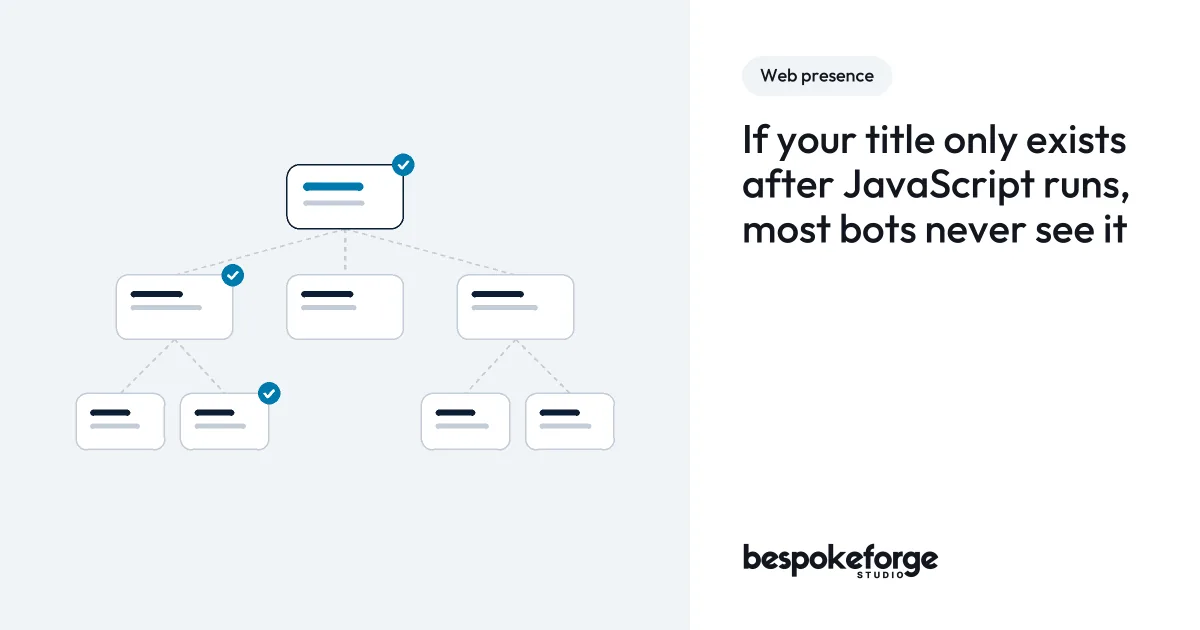
The same scene becomes the article’s share image, drawn on the server with GD. It carries the still picture, the discipline, the title and the wordmark at 1,200 by 630, drawn at twice the size and scaled down so the edges stay smooth. The words are set in the site’s own Outfit. Each file is named from a hash of everything drawn on it, so a new title makes a new file. It is written whole under a temporary name and only then renamed into place, so no reader ever sees half a PNG:
$tmp = $path . '.tmp-' . wp_generate_password( 8, false );
if ( imagepng( $canvas, $tmp ) && rename( $tmp, $path ) ) {
    return $path; // no reader ever sees half a PNG
}
@unlink( $tmp );
The first versions taught me what titles really look like. A long word ran straight past the edge of the card. A title containing “<200ms” was stripped as if it were an HTML tag. And the one that made me sit up: share images were being drawn for drafts too, so a draft’s title could reach a public image before the article existed. Now only a published article without a password gets a share image, and unpublishing one removes its files.
One honest number: counting visitors without cookies or IP addresses
I wanted to know one thing: how many people read each page. I did not want to know who they were, where they came from, or what they did on other websites, and I did not want a consent banner standing between a buyer and the first screen.
The old site had an analytics script that fired events into the void. The new one has a counter of its own, built to respect the GDPR and the Nigeria Data Protection Act by design, by collecting almost nothing. When a page opens, the browser tells the site’s own server which page it was, and the server adds one to that page’s count for the day. That is the entire record: the page, the day and the count. No cookie, no identifier, no IP address, nothing stored in the browser, and no other company involved. One table, one query per view:
INSERT INTO wp_bf_counts (day, path, views) VALUES (%s, %s, 1)
ON DUPLICATE KEY UPDATE views = views + 1;
The interesting part is the cache. Pages sit in a full-page cache for days, so PHP never runs on most visits, and a WordPress nonce printed into a cached page goes stale. So each page prints its own path with a signature, and the endpoint only counts a path whose signature matches. The signature never expires, so a page cached a week ago still counts:
// In the page:
$sig = hash_hmac( 'sha256', $path, wp_salt( 'nonce' ) . '|bf-count' );

// At the endpoint:
if ( ! hash_equals( $expected, (string) $request['s'] ) ) {
    return new WP_REST_Response( null, 400 );
}
The browser sends it with navigator.sendBeacon(), or a fetch() with keepalive and credentials left out. A search, a feed, a 404, a preview and my own signed-in visits never count.
Its first weakness was a clever one. The search page answers any address with a 200, so it would hand out a valid signature for whatever made-up path a bot asked for, and the table could fill with pages that never existed. Now a page counts under the address WordPress actually resolved, never the address someone requested, and a search or a 404 prints no beacon at all.
The counter has one limit. Without an identifier, a script that loads a real page over and over can still inflate that page’s count. It cannot invent a page. Stopping it would need the visitor’s address, which is the one thing the counter refuses to keep. I would rather have a number I can mostly trust than a visitor I can identify.
The part of a rebuild nobody talks about: deleting things
Every rebuild story shows the new pages. Almost none of them show the skip outside. Mine was full: templates nothing rendered, two old post types, archives nobody should ever reach, ten guides that said overlapping things, and CSS that had only ever grown.
Deleting is easy. Proving the deletions changed nothing a visitor could see is the hard part. So before removing anything, I captured the HTML of all 79 pages and screenshot slices of every page at two widths, and every removal afterwards had to leave both comparisons unchanged, apart from the changes I made on purpose.
- 764 CSS rules, 36 custom properties and 178 comments went. The two CSS files fell from 6,742 lines to 3,621.
- 25 field groups and 295 fields nothing read went. One settings group fell from 78 fields to 29, and every value I kept read the same before and after.
- Ten overlapping guides became three. The seven absorbed ones became drafts, and their addresses forward to the guide that took them in.
- Retired addresses answer 404, with no redirects: the old engagement lists, date and author archives, anything under a private post type. A redirect says “this moved”. These did not move. They stopped. The old client lists were the exception. Their clients moved to the case studies, so since 12 October those addresses forward there.
The CSS prune is where I learned to trust pixels over code. A rule only counts as dead when every selector in it needs a class that no page, script or template can produce. The first prune passed every HTML comparison, and then the screenshot comparison found 131 slices that differed: the second-level entries of the “On this page” contents had lost their indent on every article. The navigation script builds that class from parts, 'toc-' + tag, so no file ever contains the whole name. The finder now reads every prefix that ends a joined string, and four rules came back from the dead.
Then the screenshot comparison cried wolf. A final run differed on 1,484 of 1,577 slices, all at the edges of letters, including pages whose HTML had not changed at all. My monitor had gone to sleep, and the headless browser then drew text with a different gamma. I kept the screen awake, ran it again, and two untouched pages matched to the pixel. The lesson stuck: when a comparison fails everywhere at once, suspect the instrument before the code.
The problems I ran into, and how I fixed them
Most of what went wrong on this build shared one shape. Something ran, returned cleanly, reported success, and was wrong. These are the ones I would warn another developer about over a coffee.
The tool drifted towards the average website. Claude Code made this build fast. A new brand, a design system and every page of a site in ten days is not a pace I could have kept typing every line myself. But the speed has a limit, and every tool built on a large language model shares it. It drifts. Quietly, and always in the same direction, towards the average website. Build a page from a design with it and you get something plausible. The components are right, the spacing is close, and it reports with confidence that everything passed.
The homepage was my first lesson. On 3 October it passed every check I had and still was not the page I had designed. The buttons in its rows of cards did not line up, the spacing had wandered, and the right components sat in the wrong shape. Nothing was broken. It just was not mine. Once I knew to look for it, I saw the same pull everywhere:
- A warm accent crept back in twice. Warm accents are on half the websites ever made, and my brief says never. I took it out both times, and the rule now sits at the top of my brief, where it cannot be missed a third time.
- The inner pages’ headings came out louder than the homepage’s, up to 64 pixels against its 56, because the biggest size was the obvious choice. My rule is that no hero heading on the site is bigger than the homepage’s, so every other hero now works its size out from the homepage’s own formula.
- The first homepage was calm, correct and completely still, when the brief asked for a site that feels alive. I fixed it with the scroll animations above.
None of these would ever show up in a test report. Every one of them would have shown up in a buyer’s gut feeling. The fix was to stay in the work every day. The brief sat open beside the build. I rendered every page beside its board and compared them section by section before I called it done. I read every page the way a visitor gets it, never the way a tool reports it. And every time something drifted, I wrote the correction down as a rule the next page had to follow, so the same drift could not happen twice.
One click opened two calendars. “Start with the audit” opens the booking calendar in a dialog instead of sending you down a long page. The booking service’s script turns any element carrying its link attribute into a popup trigger, and my dialog carried that attribute, so a click anywhere inside it opened a second calendar behind the first. The dialog now carries its own attribute names. The same dialog first opened in the top-left corner, because the theme’s CSS reset had removed the automatic margins a modal dialog uses to centre itself; margin: auto put it back.
The Services menu closed on the way down. There was a 12-pixel gap between the menu link and its panel, and a pointer crossing it let the panel close. A bridge across the gap and a short delayed close fixed it, so the menu stays open while the pointer travels.
A form on a cached page went stale. A WordPress nonce in a page cached for a week stops validating long before the page leaves the cache. The site’s forms act in nobody’s name, so they carry no nonce at all. They are guarded instead by a honeypot, a token the page’s own script adds, a minimum time on the page and a rate limit.
A time check dropped real orders. The order form refused anything submitted too quickly, which is right, and anything submitted after too long, which was wrong: a page left open over lunch, or a laptop with its clock running fast, lost the order. The check now has a floor and no ceiling, measured by the browser’s own monotonic clock.
Saving an order emptied every cache. The cache plugin purged every layer, and the form’s own rate-limit guards with them, every time an order was stored as a private post that no page ever shows. It now skips post types no visitor can see.
A content script matched its own work. I wrote a fix that replaced a sentence with a longer one containing the original. On the next run, the script found the old words again inside the new ones and made the change twice. It now skips anything that already holds the new words.
An apostrophe took my local site down. A script I wrote to put new words into a copy deck left an unescaped apostrophe inside a single-quoted PHP string, and the whole site stopped for three minutes. The script now escapes in context, checks every file it changes with PHP’s own linter, and puts the file back if it does not parse.
The lesson under all of them is the same, and I now build everything around it. Read the outcome, never the exit code, and never a tool’s report of its own work.
That is how I build for clients too. You get the speed of the tools, and you get me, holding every page to what you set out to achieve. The tools are fast at plausible. The brief is what makes the result yours.
Where it was, where it stands, and what comes next
Ten days, set side by side:
| The old site | The new site | |
|---|---|---|
| Homepage | 13 sections, about 15 screens tall | 7 sections, the hero owns the first screen |
| Typefaces | A serif and a sans-serif, with faked italics | Outfit only, one 21 KB file |
| Colour | Indigo on warm paper, teal, lavender in the dark | Navy and one cerulean accent on white, a full navy dark mode |
| Animation | 1,214 lines that hid content when they failed | 203 lines, motion on every page, nothing ever stranded |
| CSS | 6,742 lines | 3,621 lines |
| Words | Split between templates, fields and options | Every word a field, with an approved default |
| Service pages | 17, each with a starting price | 14, each scoped from the audit |
| Article pictures | None | One per article, drawn in code, with its own share image |
| Visitor counts | A script nothing listened to | One cookieless number per page per day |
On the live site, PageSpeed Insights gives the homepage 99 to 100 for performance on a phone across four runs, and 100 on desktop, in Lighthouse 13.5.0 on 9 October 2026. The largest paint comes at 1.7 seconds on the emulated phone and 0.4 on desktop, layout shift is 0, and accessibility, best practices and SEO all score 100. Those figures sit on the site itself now, in the proof bands, under the name “This site”, beside the figures from client work.
What comes next is automation. Today, a Search Baseline order is saved on the site and lands in my inbox. Next, it goes straight into the studio’s n8n. That sends the client a confirmation with the Search Console steps that match their answers, and tells me to issue the invoice. The site keeps its own copy in case anything along the way fails. My next article is about how the forms and orders on this site feed the automation that runs the studio. After that come off-site backups and the monitoring around the site, because a site you are proud of is only as good as your last restore.
If your own site has grown in place the way mine had, the audit is where I would start. It looks at what you have, what it should do, and what is worth keeping.